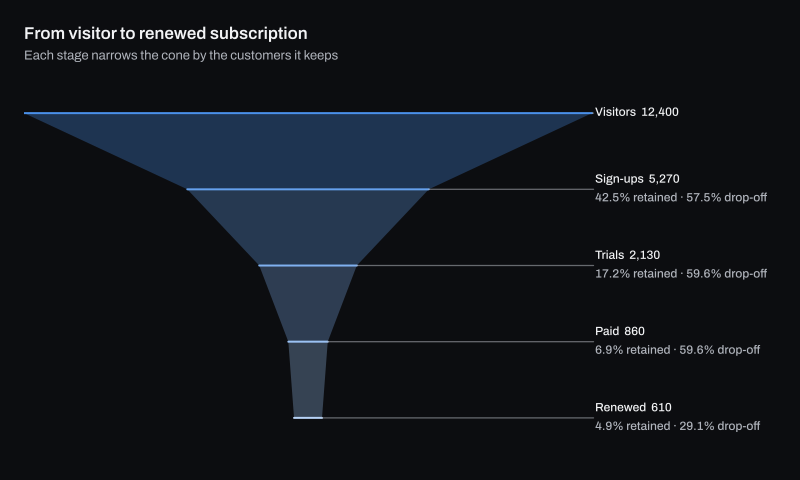
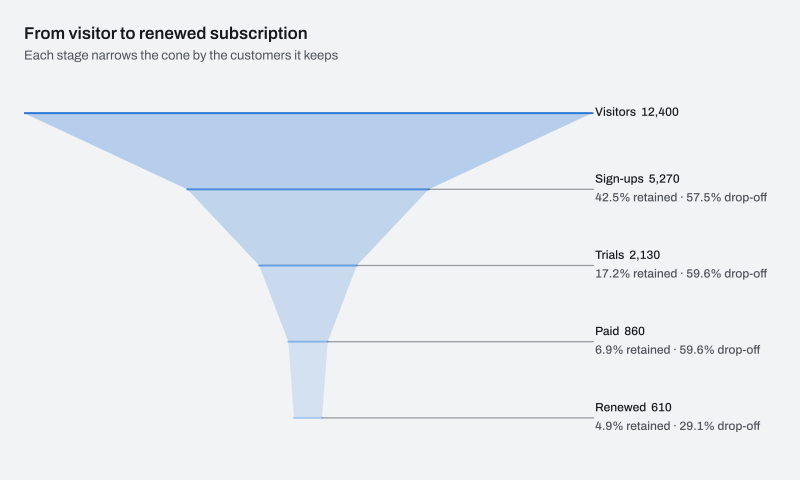
The interactive HTML page ChartForgeX writes for this chart. Hover for values, click legend items to hide or show series, use the keyboard to navigate, and right-click for export and reset. Where the chart can redraw a zoomed range, use the wheel to zoom, choose Pan to move the window, or choose Brush and drag to zoom to a range.
Build it in C#
This is the code for the chart above. Show setup adds the imports before it and the few lines that write SVG, PNG and HTML after it, so it reads as one program; the download is the complete console program, ready to run with the ChartForgeX package.
Gets independent category visibility, physical placement and typography in Separate mode. Null inherits series/chart placement; Auto prefers the outside rail.
Gets independent value visibility, physical placement and typography in Separate mode. Null inherits series/chart placement; Auto prefers the mark interior.
Gets or sets the optional shared stage outline policy. Point stroke colors take precedence over its color; null preserves the existing unoutlined partition or Cone line.