Preview
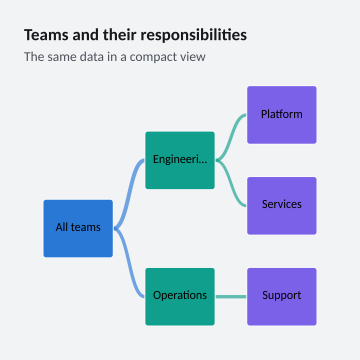
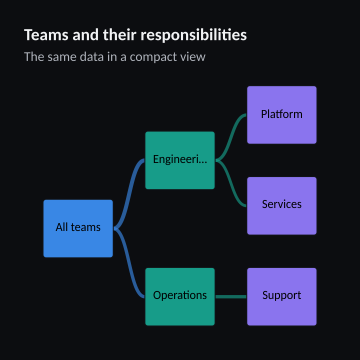
360 × 360 pixels
Create this example
Create a console project, add the ChartForgeX package, and replace Program.cs with this source. Run it to write SVG, PNG and HTML with the default system fonts.
For the same typography as the gallery, download the gallery-font recipe and copy the gallery’s fonts directory beside your program.
using System;
using System.Collections.Generic;
using System.Globalization;
using System.IO;
using System.Linq;
using ChartForgeX.Core;
using ChartForgeX.Primitives;
using ChartForgeX.Rendering;
using ChartForgeX.Themes;
using ChartForgeX.Topology;
using ChartForgeX.Typography;
using ChartForgeX.VisualArtifacts;
using ChartForgeX.VisualBlocks;

var mode = VisualThemeMode.Light;
var theme = VisualTheme.Graphite();
var model = TreeRecipe.Create("compact", mode);
var context = new VisualRenderContext(
    new VisualLayoutOptions(new VisualSize(360, 360)), theme, mode,
    new VisualFrame("Teams and their responsibilities", "The same data in a compact view", showLegend: null, showSurface: false));
var prepared = model.Prepare(context);
File.WriteAllText("visual.svg", prepared.ToSvg());
File.WriteAllBytes("visual.png", prepared.ToPng());
File.WriteAllText("visual.html", prepared.ToArtifact("example", VisualArtifactKind.Chart).ToHtmlPage());

/// <summary>A connected team hierarchy with stable node identities independent of display labels.</summary>
public static class TreeRecipe {
    public static Chart Create(string variant = "wide", VisualThemeMode mode = VisualThemeMode.Light) {
        var nodes = new[] {
            new ChartNode("all", "All teams"), new ChartNode("engineering", "Engineering"), new ChartNode("operations", "Operations"),
            new ChartNode("platform", "Platform"), new ChartNode("engineering-support", variant == "options" ? "Support" : "Services"),
            new ChartNode("operations-support", "Support")
        };
        var links = new[] {
            new ChartTreeLink("all", "engineering", 60), new ChartTreeLink("all", "operations", 40),
            new ChartTreeLink("engineering", "platform", 35), new ChartTreeLink("engineering", "engineering-support", 25),
            new ChartTreeLink("operations", "operations-support", 40)
        };
        var teams = ChartSeries.CreateTree(new ChartSeriesId("teams"), "Teams", nodes, links);
        return Chart.Create().WithDataLabels().AddSeries(teams).WithValueFormat(ChartValueFormat.Number("0.##", CultureInfo.InvariantCulture));
    }
}
using System;
using System.Collections.Generic;
using System.Globalization;
using System.IO;
using System.Linq;
using ChartForgeX.Core;
using ChartForgeX.Primitives;
using ChartForgeX.Rendering;
using ChartForgeX.Themes;
using ChartForgeX.Topology;
using ChartForgeX.Typography;
using ChartForgeX.VisualArtifacts;
using ChartForgeX.VisualBlocks;

var mode = VisualThemeMode.Dark;
var theme = VisualTheme.Graphite();
var model = TreeRecipe.Create("compact", mode);
var context = new VisualRenderContext(
    new VisualLayoutOptions(new VisualSize(360, 360)), theme, mode,
    new VisualFrame("Teams and their responsibilities", "The same data in a compact view", showLegend: null, showSurface: false));
var prepared = model.Prepare(context);
File.WriteAllText("visual.svg", prepared.ToSvg());
File.WriteAllBytes("visual.png", prepared.ToPng());
File.WriteAllText("visual.html", prepared.ToArtifact("example", VisualArtifactKind.Chart).ToHtmlPage());

/// <summary>A connected team hierarchy with stable node identities independent of display labels.</summary>
public static class TreeRecipe {
    public static Chart Create(string variant = "wide", VisualThemeMode mode = VisualThemeMode.Light) {
        var nodes = new[] {
            new ChartNode("all", "All teams"), new ChartNode("engineering", "Engineering"), new ChartNode("operations", "Operations"),
            new ChartNode("platform", "Platform"), new ChartNode("engineering-support", variant == "options" ? "Support" : "Services"),
            new ChartNode("operations-support", "Support")
        };
        var links = new[] {
            new ChartTreeLink("all", "engineering", 60), new ChartTreeLink("all", "operations", 40),
            new ChartTreeLink("engineering", "platform", 35), new ChartTreeLink("engineering", "engineering-support", 25),
            new ChartTreeLink("operations", "operations-support", 40)
        };
        var teams = ChartSeries.CreateTree(new ChartSeriesId("teams"), "Teams", nodes, links);
        return Chart.Create().WithDataLabels().AddSeries(teams).WithValueFormat(ChartValueFormat.Number("0.##", CultureInfo.InvariantCulture));
    }
}