Preview
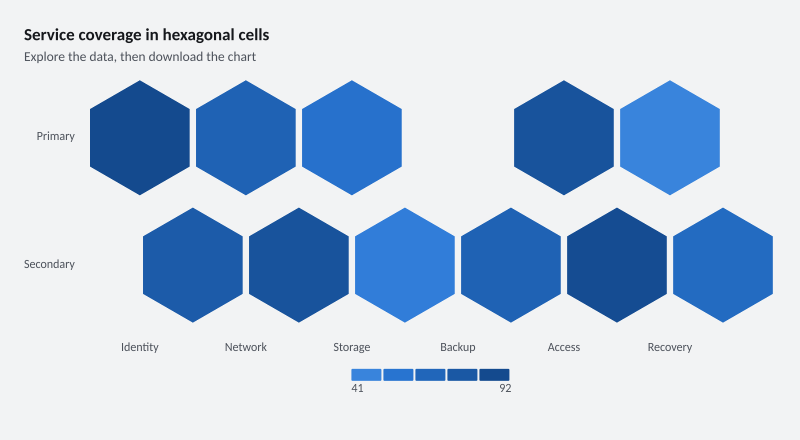
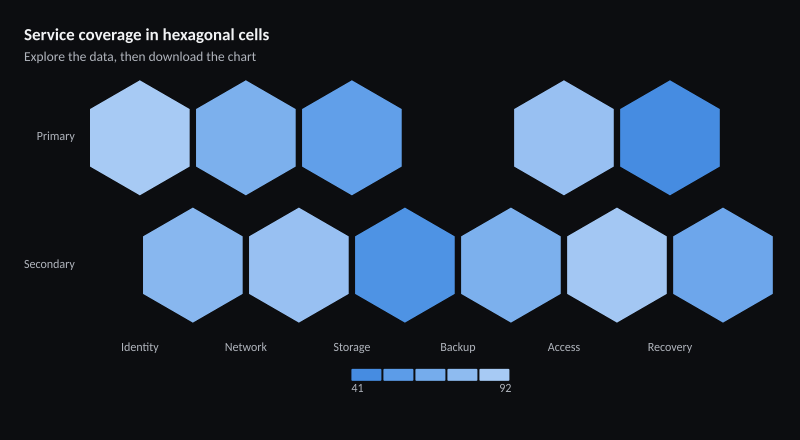
800 × 440 pixels
Create this example
Create a console project, add the ChartForgeX package, and replace Program.cs with this source. Run it to write SVG, PNG and HTML with the default system fonts.
For the same typography as the gallery, download the gallery-font recipe and copy the gallery’s fonts directory beside your program.
using System;
using System.Collections.Generic;
using System.Globalization;
using System.IO;
using System.Linq;
using ChartForgeX.Core;
using ChartForgeX.Primitives;
using ChartForgeX.Rendering;
using ChartForgeX.Themes;
using ChartForgeX.Topology;
using ChartForgeX.Typography;
using ChartForgeX.VisualArtifacts;
using ChartForgeX.VisualBlocks;

var mode = VisualThemeMode.Light;
var theme = VisualTheme.Graphite();
var model = HexbinHeatmapRecipe.Create("wide", mode);
var context = new VisualRenderContext(
    new VisualLayoutOptions(new VisualSize(800, 440)), theme, mode,
    new VisualFrame("Service coverage in hexagonal cells", "Explore the data, then download the chart", showLegend: null, showSurface: false));
var prepared = model.Prepare(context);
File.WriteAllText("visual.svg", prepared.ToSvg());
File.WriteAllBytes("visual.png", prepared.ToPng());
File.WriteAllText("visual.html", prepared.ToArtifact("example", VisualArtifactKind.Chart).ToHtmlPage());

/// <summary>Shows service coverage as rows of hexagonal cells.</summary>
public static class HexbinHeatmapRecipe {
    /// <summary>Creates numeric coverage rows with explicit missing-cell positions.</summary>
    public static Chart Create(string variant = "wide", VisualThemeMode mode = VisualThemeMode.Light) {
        if (variant is not ("wide" or "compact" or "sparse" or "options" or "compact-options")) throw new ArgumentOutOfRangeException(nameof(variant));
        return Chart.Create().WithXLabels("Identity", "Network", "Storage", "Backup", "Access", "Recovery")
            .AddHexbinHeatmapRow("Primary", new double?[] { 92, 70, 56, null, 84, 41 }, id: new ChartSeriesId("primary-measurements"))
            .AddHexbinHeatmapRow("Secondary", new double?[] { 76, 84, 46, 70, 90, 62 }, id: new ChartSeriesId("secondary-measurements"))
            .WithHeatmapScale(ChartHeatmapScale.Sequential).WithHeatmapCellGap(3).WithHeatmapCellRadius(3)
            .WithHeatmapValueTextMode(ChartHeatmapValueTextMode.Auto)
            .WithValueFormat(ChartValueFormat.Number("0.##", CultureInfo.InvariantCulture));
    }
}
using System;
using System.Collections.Generic;
using System.Globalization;
using System.IO;
using System.Linq;
using ChartForgeX.Core;
using ChartForgeX.Primitives;
using ChartForgeX.Rendering;
using ChartForgeX.Themes;
using ChartForgeX.Topology;
using ChartForgeX.Typography;
using ChartForgeX.VisualArtifacts;
using ChartForgeX.VisualBlocks;

var mode = VisualThemeMode.Dark;
var theme = VisualTheme.Graphite();
var model = HexbinHeatmapRecipe.Create("wide", mode);
var context = new VisualRenderContext(
    new VisualLayoutOptions(new VisualSize(800, 440)), theme, mode,
    new VisualFrame("Service coverage in hexagonal cells", "Explore the data, then download the chart", showLegend: null, showSurface: false));
var prepared = model.Prepare(context);
File.WriteAllText("visual.svg", prepared.ToSvg());
File.WriteAllBytes("visual.png", prepared.ToPng());
File.WriteAllText("visual.html", prepared.ToArtifact("example", VisualArtifactKind.Chart).ToHtmlPage());

/// <summary>Shows service coverage as rows of hexagonal cells.</summary>
public static class HexbinHeatmapRecipe {
    /// <summary>Creates numeric coverage rows with explicit missing-cell positions.</summary>
    public static Chart Create(string variant = "wide", VisualThemeMode mode = VisualThemeMode.Light) {
        if (variant is not ("wide" or "compact" or "sparse" or "options" or "compact-options")) throw new ArgumentOutOfRangeException(nameof(variant));
        return Chart.Create().WithXLabels("Identity", "Network", "Storage", "Backup", "Access", "Recovery")
            .AddHexbinHeatmapRow("Primary", new double?[] { 92, 70, 56, null, 84, 41 }, id: new ChartSeriesId("primary-measurements"))
            .AddHexbinHeatmapRow("Secondary", new double?[] { 76, 84, 46, 70, 90, 62 }, id: new ChartSeriesId("secondary-measurements"))
            .WithHeatmapScale(ChartHeatmapScale.Sequential).WithHeatmapCellGap(3).WithHeatmapCellRadius(3)
            .WithHeatmapValueTextMode(ChartHeatmapValueTextMode.Auto)
            .WithValueFormat(ChartValueFormat.Number("0.##", CultureInfo.InvariantCulture));
    }
}